ReadMyVoice learns your voice once. From then on, turn your scripts, Word documents and PDFs into natural-sounding audio in your own voice.
Your words, spoken in your own voice.

Click ‘Start recording’ and read the passage aloud for at least 60 seconds.
“I’m going to read this aloud naturally at a relaxed pace, as if I were talking to a friend. This is the sort of thing I would say to someone sitting across the table, with a cup of tea going cold beside me. This is my own voice, recorded by me, for my own use. I am not really reading a script here so much as thinking out loud, which is rather the point, because that is how I actually sound. Yesterday I walked down to the shops for coffee and a newspaper, and the woman behind the counter asked whether I had seen the forecast. Snow by Thursday, apparently. I said I would believe that when I saw it. My neighbour swears the weather here changes its mind more often than he does, and honestly, he has a point. Last spring it rained for a fortnight, then the sun came out and everyone rushed to the park at once. Do you remember that? Children shouting, dogs chasing frisbees, and a queue for ice cream that went right round the bandstand. Wonderful! My sister says I should write all of this down one day, but I would much rather just tell it, the way I am telling you now. Now, where was I? Numbers, I suppose: one, two, three, four, five, six, seven, eight, nine, ten. Half past six. Ninety-eight pounds fifty. And do you know what? That really was the best part of the whole week — I’m smiling just thinking about it. I’m now at the end of the passage, so, as long as I’ve recorded at least 60 seconds of audio, I’ll press the “Finish recording” button.”
Hear how your voice sounds
Like what you hear?
Create your free ReadMyVoice account to keep it.
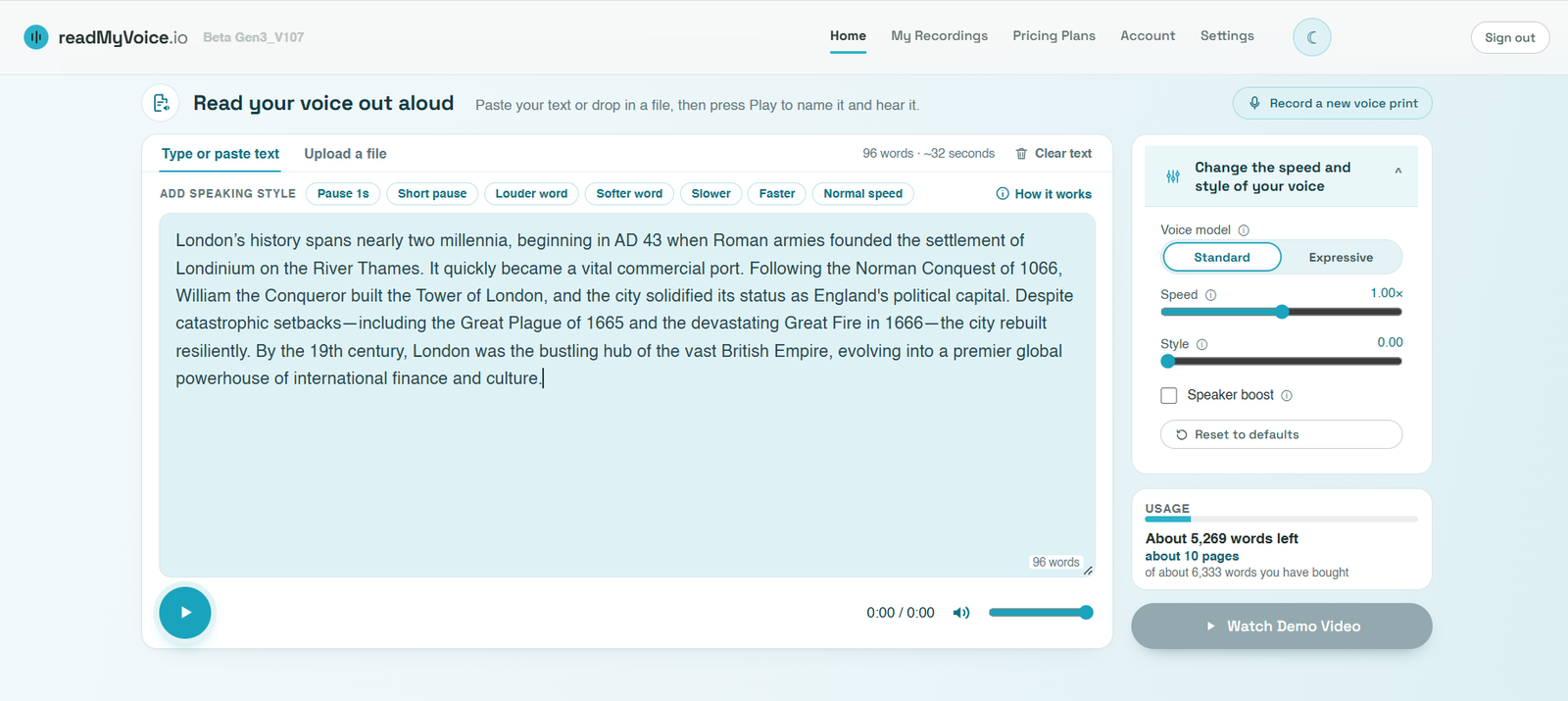
Read your voice out aloud
Paste your text or drop in a file, then press Play to name it and hear it.
Select the words you want to change, then press a button. The style is applied to your selection: louder and softer count the words for you, slower and faster wrap them and set the pace back afterwards, a pause goes in after them, and an acting cue goes in front. With nothing selected, the command is put in wherever the cursor is.
Styled words are shaded in the text box so you can see what you have changed: blue for louder, grey for softer, green for a change of pace, purple for an acting cue, and a tinted box around the command itself. Delete the command to undo it.
You can also type these in square brackets anywhere in your text. They are never read aloud and do not count towards your words.
- [pause 2] silence for 2 seconds. Any length from 0.1 to 10, e.g. [pause 0.3] or [pause 5].
- [loud 3] the next word much louder, which is what the button uses; [loud 1] and [loud 2] are gentler. [soft 1] to [soft 3] do the same the other way.
- For more than one word, add a comma and how many: [soft 1,3] makes the next 3 words quieter, [loud 2,5] the next 5 words louder.
- [slow], [fast] or [speed 0.9] change the pace from that point; [normal] goes back.
- Acting cues such as [laughs], [whispers], [sighs], [excited] or [sarcastic]: Expressive performs them. Speed commands do not apply to this model.
- Acting cues such as [laughs] need the Expressive model (Voice model, on the right); with Standard they are left out.
Happy with how your voice sounds? If not, try changing the voice model or style or recording a new voice print.
Create YouTube voiceovers in your own voice.
Record your voice once. Then turn your scripts into natural-sounding voiceovers whenever you need them.
No credit card required
- Your voice, not an AI voice
- Save hours of recording and editing
- Perfect for YouTube, Shorts, podcasts and more
From script to voiceover in 4 simple steps.
Record your voice once
Give ReadMyVoice a short sample of your voice. It only takes a minute and a half.
Upload your script
Use a Word document, PDF or plain text. Add your script and choose your voice.
Generate in your voice
ReadMyVoice turns your script into natural-sounding audio — in your voice.
Download & add to your video
Get your audio file and drop it into your editing software.
Stop recording every video
Recording voiceovers is time-consuming. You make mistakes, say “umm” and “ahh”, then spend ages editing and re-recording.
It’s frustrating and it slows you down.
That’s actually my voice.
See how easy it is to create voiceovers in your own voice. Just record once, then generate unlimited voiceovers from your scripts.
ReadMyVoice learns your voice, so your content sounds like you — every time.
Choose the plan that fits your workflow.
Start free and upgrade whenever you need more words.
Your voice. Your words. Your content.
Create YouTube voiceovers in your own voice — without the recording.
My Recordings
Everything you have had read back to you. Edit names as appropriate and tick any of them to download or delete.
Pricing
Buy a pack of characters once. There is no subscription, nothing renews, and what you buy never expires.
Prices in GBP. A pack is a one-off payment — buy another whenever you run low, and the characters are added to what you already have. Characters are counted as they are sent to be read aloud, so reading the same passage twice uses it twice. Word, page and time figures are approximate: they assume about six characters per word, 3,000 characters per page and 180 words a minute, so the real figure varies with your text.
Privacy policy
How readMyVoice.io handles your recordings, your text and your account. Last updated 17 September 2026.
This policy explains what readMyVoice.io collects, why, and what you can do about it. It is written for the service as it actually works — there is nothing here that the app does not do.
Who we are
readMyVoice.io is operated by IWAY Studios Limited (company number 17416986), the data controller for the personal data described below. For anything in this policy, including a request to exercise your rights, contact privacy@readmyvoice.io.
What we collect
- Account details — your email address, an encrypted password, your plan and your remaining character allowance.
- Your voice sample — the recording you make in Step 1.
- Your synthetic voice — the model built from that sample.
- Text you give us — passages you paste, type or upload, and the name you give each one.
- Audio we generate — the MP3 of each reading you choose to save, kept so you can find it again under My Recordings. Readings you do not save are not stored.
- Usage — how many characters you have synthesised, counted against your plan.
We do not use advertising trackers, we do not build profiles for marketing, and we do not sell personal data to anyone.
Your voice is special category data
A recording used to build a model that reproduces how you personally sound is biometric data. Under UK and EU data protection law, processing biometric data to uniquely identify someone needs your explicit consent — that is exactly what the confirmation box in Step 1 is for, and why the service will not create a voice until you tick it.
You can withdraw that consent at any time by deleting your voice on the Account tab. Doing so removes the synthetic voice; it does not undo readings already generated, which you can delete separately under My Recordings.
Why we are allowed to process it
- Explicit consent — for your voice sample and the synthetic voice made from it.
- Performance of a contract — to run your account, apply your plan and meter your allowance.
- Legitimate interests — keeping the service secure and preventing misuse, balanced against your rights.
Who else sees it
We use two processors. Each acts only on our instructions under a written contract, and neither may use your data for their own purposes:
- Supabase — sign-in, the database holding your account and history, and the file storage holding your audio. Hosted in Europe.
- ElevenLabs — voice cloning and speech synthesis. This is the one third party that receives both your voice sample and the text you ask to have read aloud.
Word documents and PDFs you drop in are opened in your own browser. The file itself is never uploaded — only the text you then choose to synthesise leaves your device.
How long we keep it
- Voice sample and synthetic voice — until you delete them, or 30 days after you close your account.
- Readings and their text — until you delete them under My Recordings, or when your account is closed.
- Account and billing records — for the life of the account, then for 6 years where we are required to keep financial records.
Your rights
You can ask us to give you a copy of your data, correct it, delete it, restrict or object to how we use it, or send it to another provider. You can withdraw consent for voice processing at any time. Most of this you can do yourself from the Account tab; for anything else, email us and we will respond within one month.
If you think we have handled your data badly, you can complain to the Information Commissioner’s Office at ico.org.uk, though we would rather you told us first so we can put it right.
Security
Traffic is encrypted in transit. Your rows in the database and your files in storage are scoped to your account, so another signed-in user cannot read your recordings. API keys for the synthesis service are held server-side and never reach the browser.
Cookies and local storage
We store a sign-in token so you stay logged in between visits, and a small preference for whether you chose the light or dark theme. That is all. There are no advertising or analytics cookies.
Children
This service is not intended for anyone under 16, and we do not knowingly create voice models from children’s recordings.
Changes
If we change this policy we will update the date at the top of the page, and for anything material we will tell you by email before it takes effect.
Welcome
Sign in, or create an account. You'll record a short voice print once — then any text you upload can be read aloud in your own voice.
Account
Signed in as
Voice print: —
Deleting your voice removes the synthetic copy permanently. Your account and remaining quota are kept; you can record a new voice print at any time.
Your balance
—
Settings
Choose how ReadMyVoice works for you.